← Autu uma
Faʻasoa ma lou aiga
Share all of a child's products at once
Share wristbands, labels and other products with the same name in one link, so the other parent gets all of the child's things straight away.
If your child has a wristband, labels and other things with the same name, you do not have to share each product on its own. One link can cover them all.
How to do it
- Open one of the child's products and tap the cog (Settings).
- Find People and tap Add a person.
- Enter the person's name and choose a role (Co-parent or Contact).
- Under Also share these products with the same name you see your other active products with exactly the same name. They are all ticked in advance. Untick the ones that should not be included.
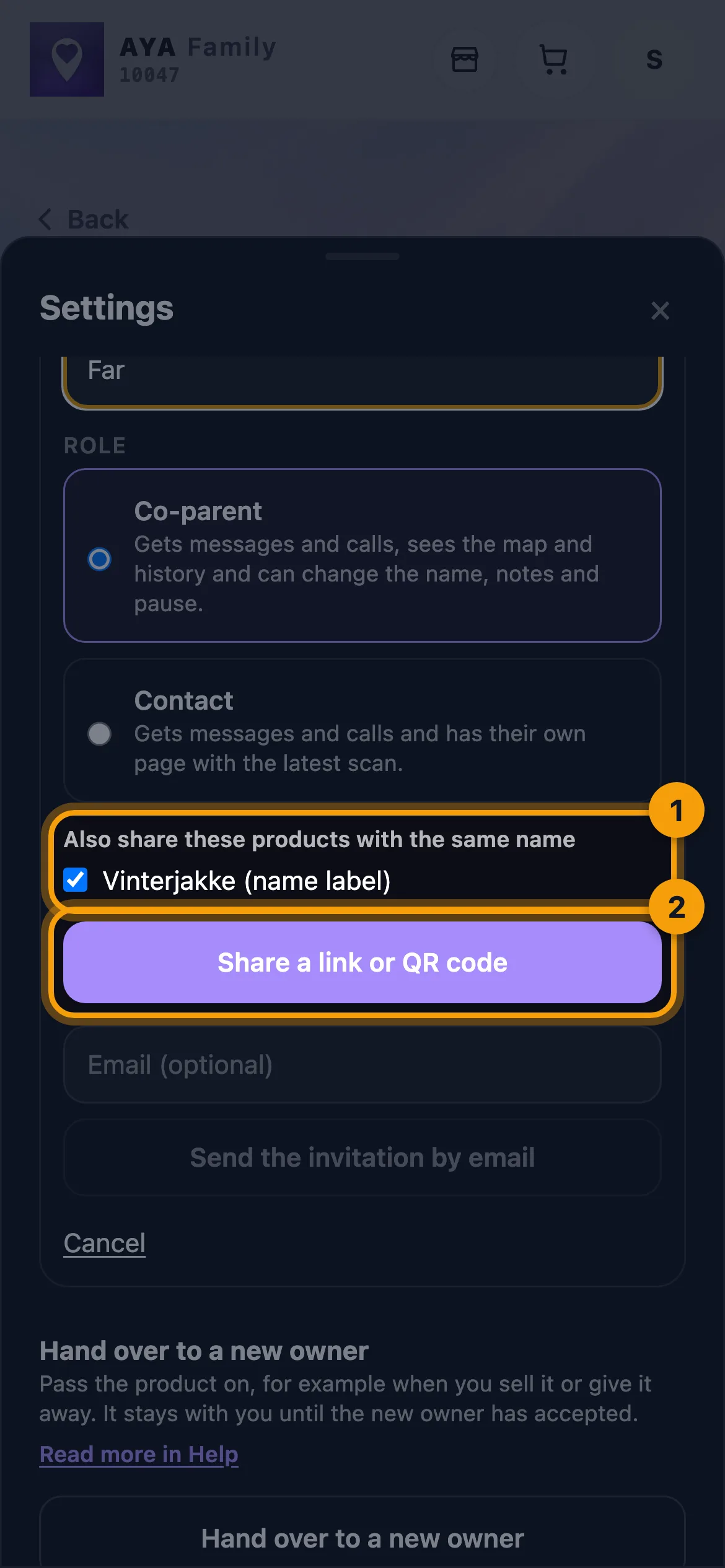
- Tap Share a link or QR code and send the link with Share, Copy link or Show QR code.
- When the other person taps Accept, they get access to all the chosen products at once. Under This is about: they can see which products the link covers.
The list is based on the name. If the wristband says Emma and the label says Emma, both are included. If one says Emma B., it is not. Correct the name first if something is missing.
Good to know
- The list only appears when you have other active products with the same name.
- The choice only applies to a link or QR code. An email invitation only covers the product you are on.
- The role is the same for every product in the link. Afterwards you can change the role on each product with Change role.
- If you buy a new product for the child later, it has to be shared on its own.
E te leʻi maua le tali?
Tusi mai ia i matou