Buyela esitolo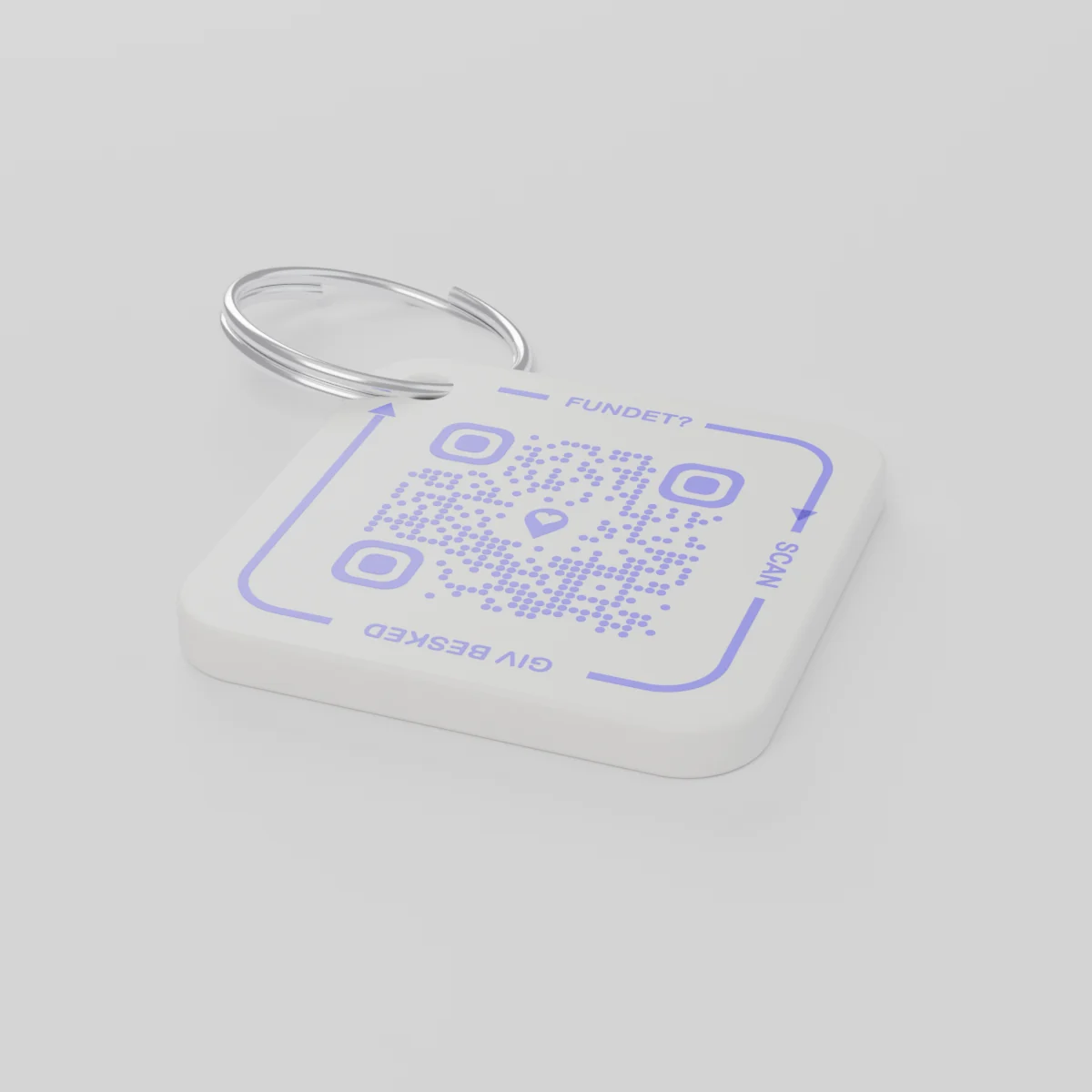
Oda kusenesikhatsiKutfunyelwa kungakendluli mhla December 14, 2026
AYA Keychain
Ithegi yetikhiye leyentiwe ngekuphrinta kwe-3D. Lotitfolako uyayiskena bese ayakwatisa.
Linani
Linani
ikhodi ye-QR 1
1
Simo
Inani liyafana, noma ngabe nikhetsani.
Sekukonkhe
€16.99
Umnyaka wekucala ufakiwe
Sibonelo sempilo yemalanga onkhe
Tikhiya tiyephi?
- Tawa ephaketheni takhe elichweni emakethe yaKhisimusi, futsi ukubona kuphela asemnyango wangaphambili.
- Lomunye umuntfu uyatitfola abese uskena lithegi letikhiya ngelucingo.
- Utfola umlayeto elucingweni abese avumelana kutsi tikhiya tingatsatfwa kuphi.
Lotitfolako akaboni inombolo yakho nome likheli lakho.
AYA noma ithegi ye-GPS?
I-tracker ikhombisa lapho intfo ikhona. I-AYA yenta loyo loyitfolile akwati kuyibuyisa.
I-GPS tracker, sibonelo i-AirTag
Ikuta kubona lapho intfo ikhona.
- Ungabona ngco lapho intfo leyo ikhona
- Loyo loyitfolile ute indlela lelula yekufinyelela kuwe
- Kufanele uyoyitsatsa wena ngekwakho
Iplatifomu ye-AYA
Ivumela loyo loyitfolile kutsi ayibuyise melula.
- Loyo loyitfolile ufinyelela kuwe ngekuskena kanye - ngaphandle kwe-app
- Ngekungatiwa futsi ihumushwa ngalokutenteka etilwimini letingu-117
- Isebenta kahle kakhulu ne-GPS tracker yakho
I-AYA isebenta ngaphandle kwesilandeleli se-GPS nobe i-AirTag?
Yebo. I-AYA yiplatifomu yekutsintsana. Isebenta yodvwa futsi nangekuhambisana ne-tracker.
What you can do
- More people can be told: share the tag with your partner, for example, so you are both told when someone finds the keys. See Share a product with the other parent.
- Report missing and offer a reward: if your keys go missing, tap Report missing in the settings. You are told at every scan and can write a message for whoever scans and offer a finder's reward. You settle it yourselves; AYA handles no money.
- Message for the finder: tap Edit to change the name, the message and What is it attached to? (for example House keys). Tap Save.
- See what the finder sees: open the tag and look at The finder sees, exactly what the finder will see.
- Pause: if you do not want to be contacted for a while, tap the Active button so it changes to Paused.
- 12 months or lifetime: the tag does not expire on its own. The platform plan takes care of renewal.
- Map and scan history: as on every AYA product.
What the finder sees
- "You found" with your name and keychain.
- Your message under Message from the owner, as you wrote it.
- Share my location, a voice call and a message with a photo to you. Your phone number is never shown.
- The AYA Keychain has no video call.
How to activate
- Put the tag on your keys and scan the QR code with your phone's camera. You can also tap Activate my AYA product on the home screen in the app.
- Enter your name under Your name. It is shown to the finder, so they know whose keys they are.
- If you like, write a Message for the finder, for example "Please hand them in at reception". The message is shown exactly as you write it and is not translated.
- If your account has no email address, you are asked to add one before the tag becomes active. With the email address you can log in from any device. See Add an email address.
- Activate. The tag now sits on the home screen in the app.
Never write your address or codes in the message for the finder. The message can be at most 160 characters.
Kuphindze kusemaphakhejini
Imininingwane yemkhicito
- Lokwakhiwe ngako
- Iplastiki ye-PETG endandatheni yensimbi
- Bukhulu
- 42 × 42 × 4.2 mm
- Umbala
- Lokumhlophe lokunekhodi ye-QR lensomi
- Ikhodi ye-QR
- Iphrintwe ngensomi njengencenye yethegi, lehlukile kuleyo naleyo thegi
- Lokusephakethe
- Ithegi le-1 lenendandatho
Kuphepha kwemkhicito
Umkhicito
AYA Keychain
Luhlobo: AYA-KC-STD
Imininingwane yekuphepha
- Umkhicito akusiyo intfo yekudlala.
- Linetincenye letincane letingagwinywa.