Boela kwa lebenkeleng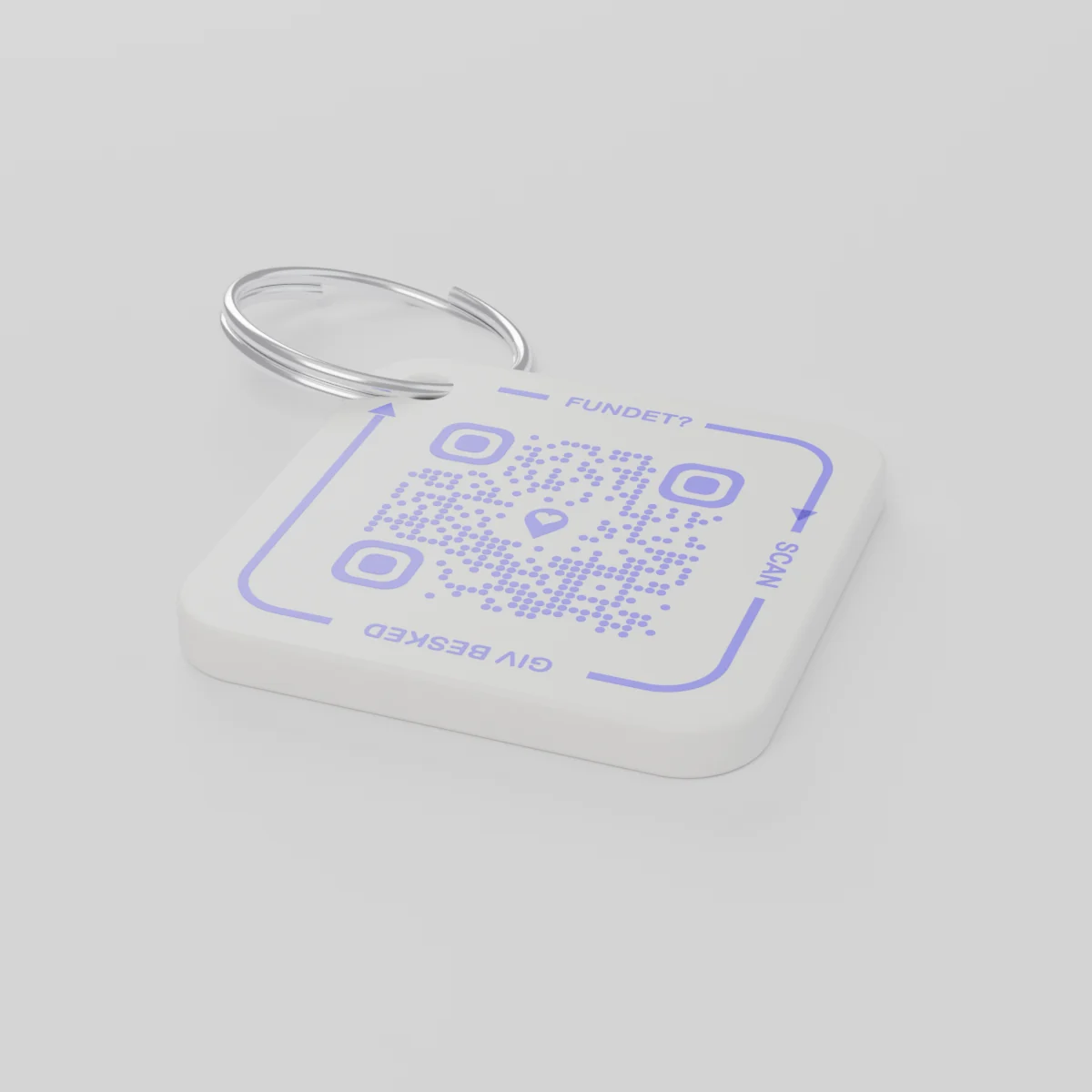
Go odara pele ga nakoE romelwa ka 2026 Sedimonthole 14 kgotsa pele ga moo
AYA Keychain
Letshwao la dilotlolo le le gatisitsweng ka 3D. Yo o di bonang o le skena mme a go itsise.
Tlhwatlhwa
Palo
khoutu e le 1 ya QR
1
Sebopego
Tlhwatlhwa e a tshwana, le fa lo ka tlhopha eng.
Palogotlhe
€16.99
Ngwaga wa ntlha o akareditswe
Sekao go tswa mo botshelong jwa letsatsi le letsatsi
Dilotlolo di ile kae?
- Di wetse mo kgetsing mo kapokong kwa mmarakeng wa Keresemose, mme o lemoga fela fa a goroga kwa kgorong ya ntlo.
- Motho o sele o di bona mme a sekena letshwao la dilotlolo ka selefouno.
- O amogela molaetsa mo founong mme a dumalana gore dilotlolo di ka tsewa kae.
Yo o di bonang ga a bone nomoro ya gago le fa e le aterese ya gago.
AYA kgotsa thegi ya GPS?
Sedirisiwa sa go latedisa se bontsha fa selo se leng teng. AYA e kgontsha moboni go se busa.
Sedirisiwa sa go latedisa sa GPS, sekai AirTag
E go thusa go bona fa selo se leng teng.
- O ka bona sentle fa selo se leng teng
- Motho yo o se bonang ga a na tsela e e motlhofo ya go ikopanya le wena
- O tshwanetse go ya ka bowena go se tsaya
Polatefomo ya AYA
E letla moboni go se busa ka motlhofo.
- Mmoni o ikopanya le wena ka go skena gangwe fela - ga go tlhokege app
- Ke ya sephiri mme e ranolelwa ka boyona mo dipuong tse 117
- E dira sentle mmogo le sedirisiwa sa gago sa go latedisa
A AYA e dira ntle le sedirisiwa sa go sala morago sa GPS kgotsa AirTag?
Ee. AYA ke sethala sa puisano. E dira e le nosi ebile e dira sentle mmogo le sedirisiwa sa go sala morago.
What you can do
- More people can be told: share the tag with your partner, for example, so you are both told when someone finds the keys. See Share a product with the other parent.
- Report missing and offer a reward: if your keys go missing, tap Report missing in the settings. You are told at every scan and can write a message for whoever scans and offer a finder's reward. You settle it yourselves; AYA handles no money.
- Message for the finder: tap Edit to change the name, the message and What is it attached to? (for example House keys). Tap Save.
- See what the finder sees: open the tag and look at The finder sees, exactly what the finder will see.
- Pause: if you do not want to be contacted for a while, tap the Active button so it changes to Paused.
- 12 months or lifetime: the tag does not expire on its own. The platform plan takes care of renewal.
- Map and scan history: as on every AYA product.
What the finder sees
- "You found" with your name and keychain.
- Your message under Message from the owner, as you wrote it.
- Share my location, a voice call and a message with a photo to you. Your phone number is never shown.
- The AYA Keychain has no video call.
How to activate
- Put the tag on your keys and scan the QR code with your phone's camera. You can also tap Activate my AYA product on the home screen in the app.
- Enter your name under Your name. It is shown to the finder, so they know whose keys they are.
- If you like, write a Message for the finder, for example "Please hand them in at reception". The message is shown exactly as you write it and is not translated.
- If your account has no email address, you are asked to add one before the tag becomes active. With the email address you can log in from any device. See Add an email address.
- Activate. The tag now sits on the home screen in the app.
Never write your address or codes in the message for the finder. The message can be at most 160 characters.
Dintlha tsa setlhagiswa
- Sedirwa
- Polasetiki ya PETG mo kgoleng ya tshipi
- Bogolo
- 42 × 42 × 4.2 mm
- Mmala
- E tshweu e e nang le khoutu ya QR e e pherese
- Khoutu ya QR
- E gatisitswe ka pherese jaaka karolo ya letshwao, e e kgethegileng mo letshwaong lengwe le lengwe
- Se se mo phuthelong
- Letshwao le le 1 le le nang le kgole
Pabalesego ya setlhagiswa
Setlhagiswa
AYA Keychain
Mofuta: AYA-KC-STD
Tshedimosetso ya pabalesego
- Setlhagiswa ga se setshameko.
- Le na le dikarolwana tse dinnye tse di ka metswang.