Bwererani ku sitolo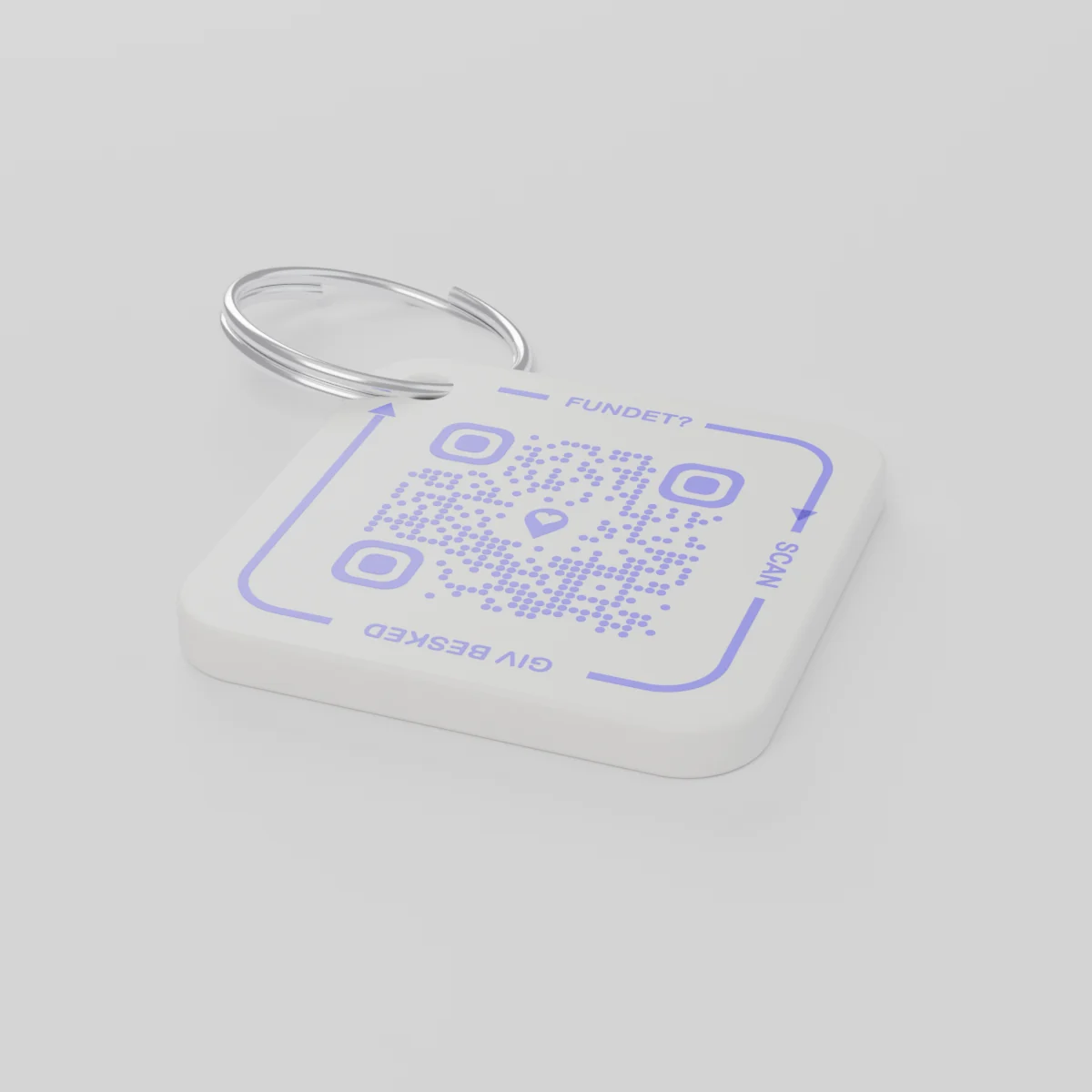
Kuyitanitsa pasadakhaleChidzatumizidwa pofika December 14, 2026
AYA Keychain
Kachizindikiro kopangidwa ndi chosindikizira cha 3D ka makiyi anu. Amene wawapeza amakasikena ndipo amakudziwitsani.
Mtengo
Kuchuluka
khodi 1 ya QR
1
Maonekedwe
Mtengo ndi womwewo, ziribe kanthu zomwe mwasankha.
Zonse pamodzi
€16.99
Chaka choyamba chikuphatikizidwa
Chitsanzo cha moyo wa tsiku ndi tsiku
Makiyi apita kuti?
- Anagwa m'thumba n'kulowa m'chipale chofewa pamsika wa Khirisimasi, ndipo amazindikira atafika pakhomo la nyumba.
- Munthu wina awapeza ndipo asikana tagi ya makiyi ndi foni.
- Alandira uthenga pa foni yake ndipo agwirizana kumene makiyiwo angatengedwe.
Wopeza saona nambala yanu kapena adiresi yanu.
AYA kapena chizindikiro cha GPS?
Chotsatira malo chimaonetsa komwe chinthu chili. AYA imathandiza wochipeza kuti achibweze.
Chotsatira cha GPS, monga AirTag
Imakuthandizani kuona komwe chinthu chili.
- Mutha kuona pomwe chinthucho chili ndendende
- Wochipeza alibe njira yosavuta yolankhulira nanu
- Muyenera kupita nokha kuti mukachitenge
Pulatifomu ya AYA
Imathandiza wochipeza kuchibweza mosavuta.
- Wochipeza amalumikizana nanu posikana kamodzi kokha - popanda pulogalamu
- Mwachinsinsi ndipo imamasuliridwa yokha m'zinenero 117
- Imagwira ntchito bwino limodzi ndi chotsatira chanu
Kodi AYA imagwira popanda chotsatira cha GPS kapena AirTag?
Inde. AYA ndi nsanja yolumikizirana. Imagwira yokha ndipo imagwiranso bwino limodzi ndi chotsatira.
What you can do
- More people can be told: share the tag with your partner, for example, so you are both told when someone finds the keys. See Share a product with the other parent.
- Report missing and offer a reward: if your keys go missing, tap Report missing in the settings. You are told at every scan and can write a message for whoever scans and offer a finder's reward. You settle it yourselves; AYA handles no money.
- Message for the finder: tap Edit to change the name, the message and What is it attached to? (for example House keys). Tap Save.
- See what the finder sees: open the tag and look at The finder sees, exactly what the finder will see.
- Pause: if you do not want to be contacted for a while, tap the Active button so it changes to Paused.
- 12 months or lifetime: the tag does not expire on its own. The platform plan takes care of renewal.
- Map and scan history: as on every AYA product.
What the finder sees
- "You found" with your name and keychain.
- Your message under Message from the owner, as you wrote it.
- Share my location, a voice call and a message with a photo to you. Your phone number is never shown.
- The AYA Keychain has no video call.
How to activate
- Put the tag on your keys and scan the QR code with your phone's camera. You can also tap Activate my AYA product on the home screen in the app.
- Enter your name under Your name. It is shown to the finder, so they know whose keys they are.
- If you like, write a Message for the finder, for example "Please hand them in at reception". The message is shown exactly as you write it and is not translated.
- If your account has no email address, you are asked to add one before the tag becomes active. With the email address you can log in from any device. See Add an email address.
- Activate. The tag now sits on the home screen in the app.
Never write your address or codes in the message for the finder. The message can be at most 160 characters.
Zambiri za katundu
- Zopangira
- Pulasitiki ya PETG pa mphete yogawanika yachitsulo
- Kukula
- 42 × 42 × 4.2 mm
- Mtundu
- Choyera chokhala ndi khodi ya QR yapepo
- Khodi ya QR
- Yosindikizidwa yapepo ngati gawo la kachizindikiro, yosiyana pa kachizindikiro kalikonse
- Zomwe zili m'phukusi
- Kachizindikiro 1 kokhala ndi mphete yogawanika
Chitetezo cha katundu
Katundu
AYA Keychain
Mtundu: AYA-KC-STD
Zambiri zokhudza chitetezo
- Katunduyu si chidole.
- Chili ndi tizigawo ting'onoting'ono tomwe tingamezedwe.