← Alle ûnderwerpen
Stipe
Contact AYA support
How to write to AYA support from the app or the website, and where to find the reply and your earlier conversations.
Stuck, or is something not working as it should? Write to us. We reply within 24 hours.
How to write to us from the app
- Tap the round icon with your initial in the top right corner to open your settings.
- Tap Contact support. You see Support inbox with your earlier conversations.
- Tap New message.
- Choose a Department, or leave it on Choose automatically (recommended).
- Under Message, write what it is about.
- If you want the reply by email, tick Reply via email and enter your email.
- Tap Send message.
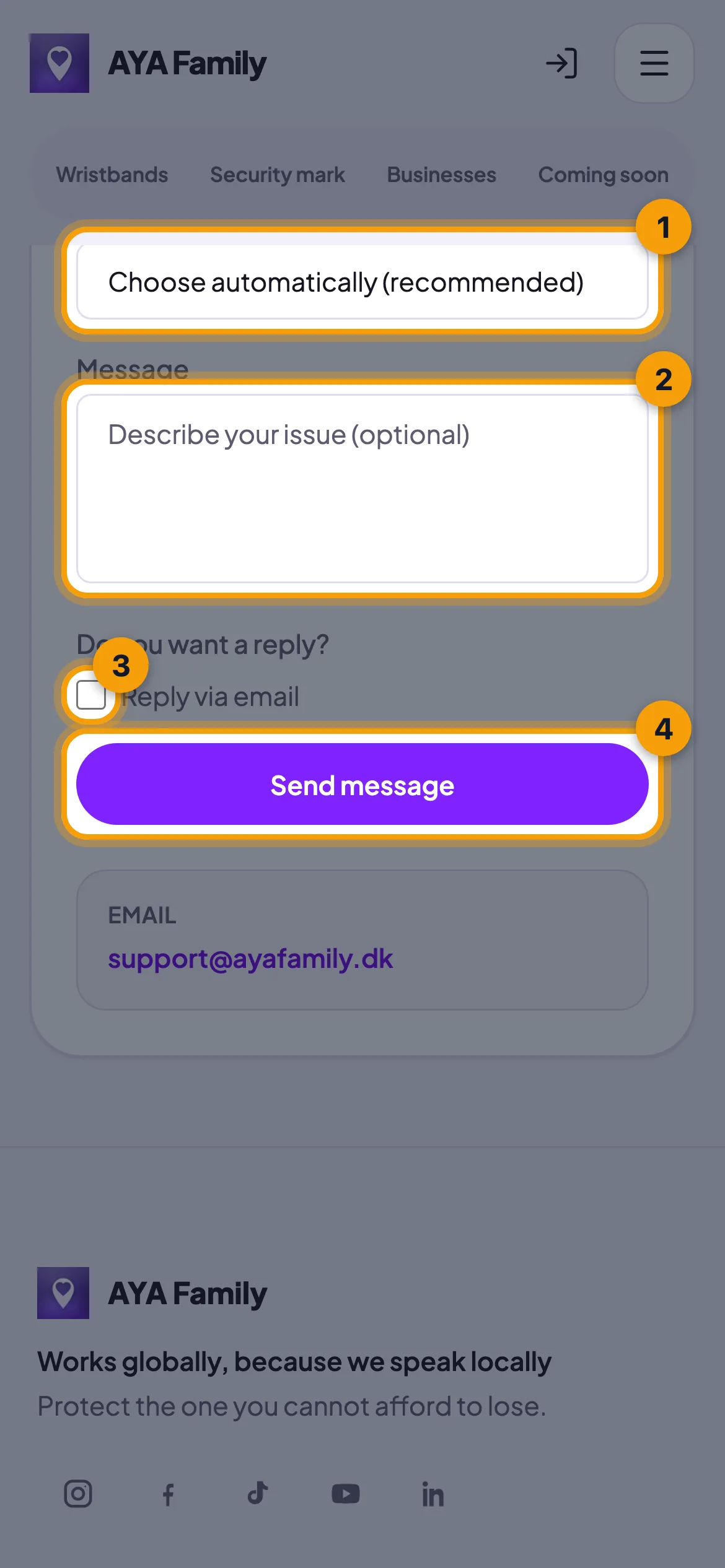
Tell us which product it is about and what you have already tried. That way we can help faster.
How to follow the conversation
- When the message is sent, it says Thank you for reaching out!. Tap Open conversation to see the thread and add more with Send reply.
- Your conversations are listed under Contact support in settings with the status Open, Replied or Closed.
- If you chose Reply via email, you also get the reply by email with a link to the thread.
- If it says This conversation is closed, start a new one with New message.
Good to know
- You can also write to us without the app at ayafamily.dk/support or by email to support@ayafamily.dk.
- Many questions are answered under frequently asked questions at ayafamily.dk/faq.
- If you have found something with an AYA code, use the buttons on the scan page. That way your message goes straight to the owner.
Net it antwurd fûn?
Skriuw ús